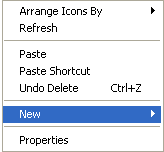
Start by creating a folder on your desktop to hold the data and then get your transaction data into it. You can name the folder anything that is memorable to you, but for our purposes here, we suggest naming the folder "Trades." This is going to be our complete project file and will contain everything related to the process. To create a new folder, click with the right hand mouse button on a blank spot on the desktop and you will get a popup menu that looks like this...
Now Download Your Data to this folder...
If you can't find out how to download your data from accessing your account online, simply contact your brokerage and ask them how you can get it to your computer in a text format or as a ".csv" file which is a comma separated values file. In virtually every case, your brokerage can supply you with the information you need to get the data to your computer, all it takes is a toll free call.